Commissioning and commercial control · Solar + BESS

From field progress to contract closeout.

Accredit your contractors, validate tests and support every payment application with evidence. Codenergy connects commissioning, commercial control and handover for your solar or BESS project.

How it works

No sign-up · Fictional data · Explore an active project or practise its initial setup.

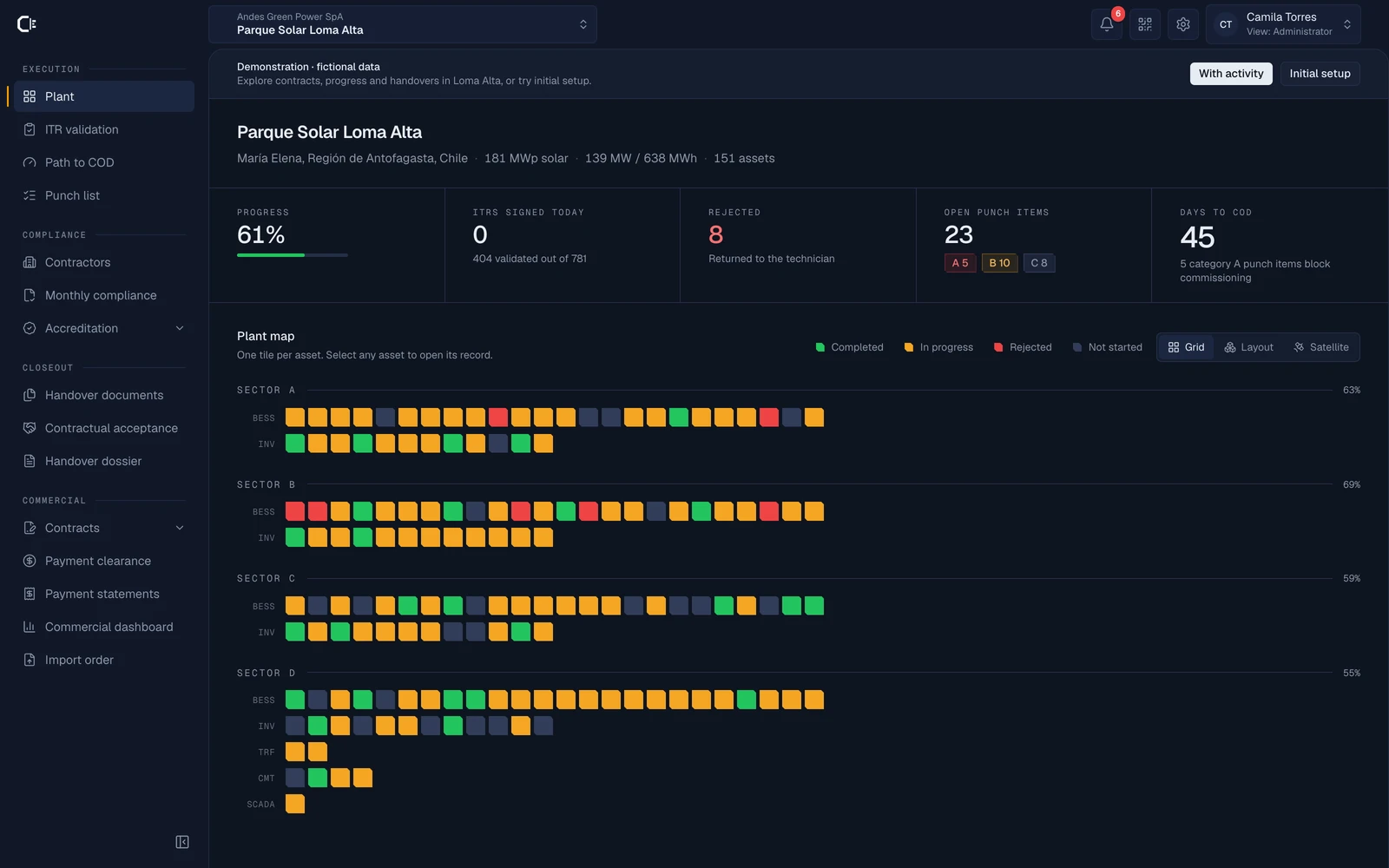
Codenergy demo: project dashboard with progress, ITRs, punch list and equipment status by sector

How the work connects

ITR validated

Evidence reviewed. Progress updated.

Loma Alta Solar Park · Demonstration with fictional data · Screenshots from the real application

The path to COD

Four workstreams. One project.

Who is cleared to work, what has been validated, how much can be certified and what remains to be delivered. Every team works within the same project, with its own permissions, evidence and decision history.

01 · Compliance

Who can enter

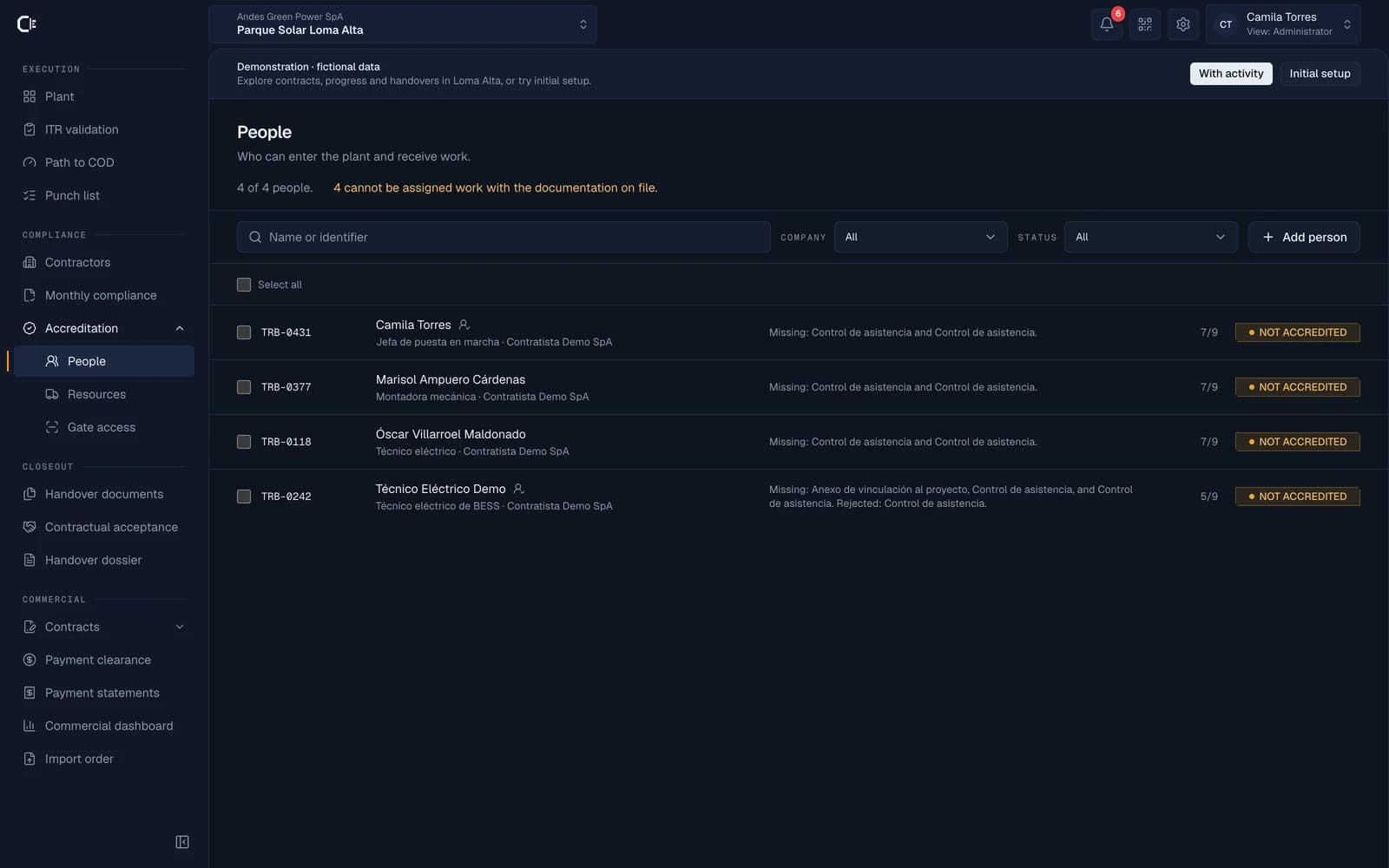
The company prequalifies before setting foot on the plant and then keeps every person, vehicle and instrument current. Contractors upload their own paperwork, the team reviews it once and the gatehouse checks it with a QR code.

  • Public credential with QR code for access control
  • Prequalification per company and a requirement matrix based on its activity
  • An expiry triggers an automatic block
Personnel accreditation screen showing accredited, expiring, and blocked statuses

02 · Execution

What is tested and what stops

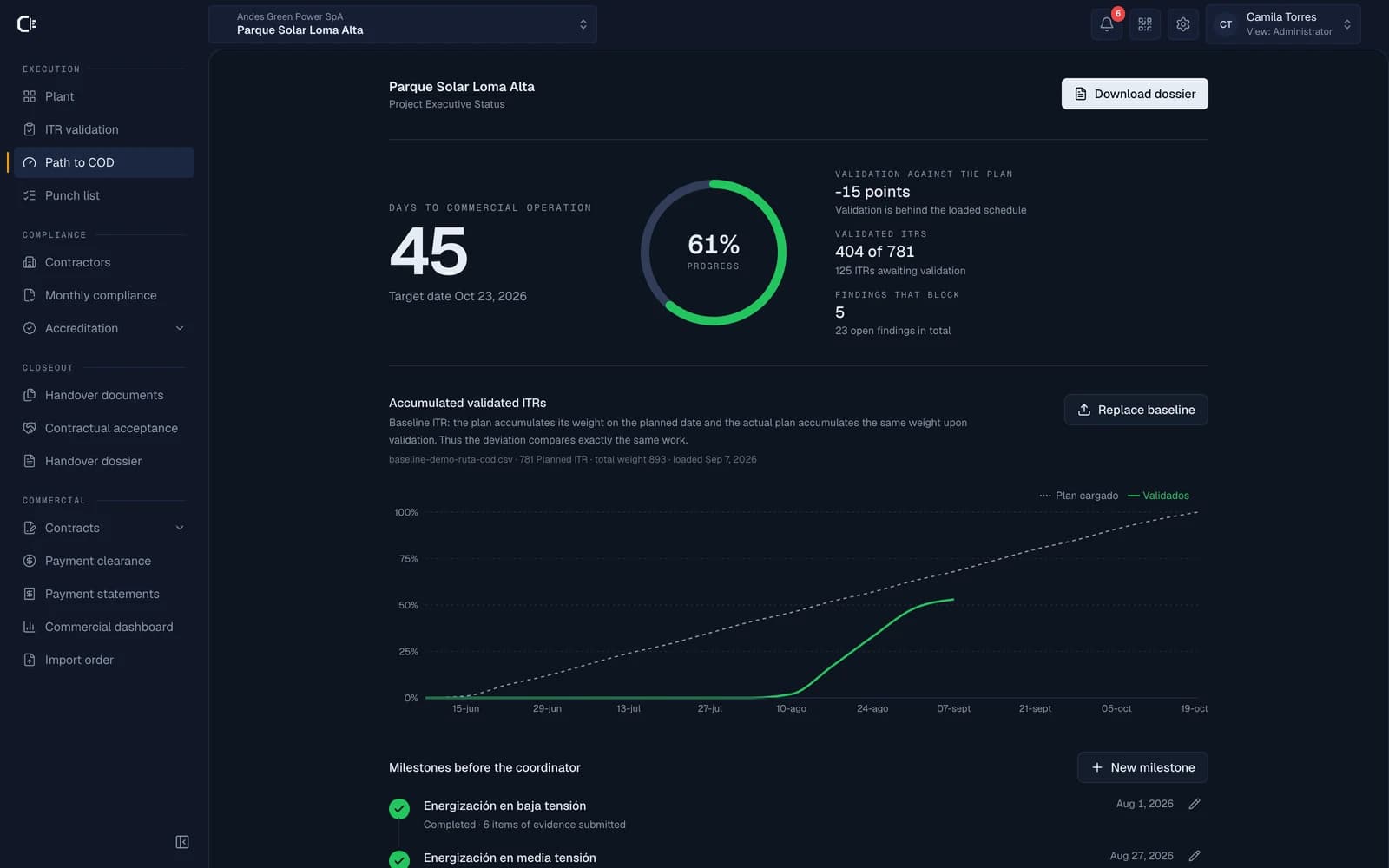
Every asset has its protocols: the technician signs in the field, the commissioning lead validates with the evidence in view, and actual progress is measured against the date committed to the Coordinator.

  • ITR with signature, measured values and photographic evidence
  • A/B/C punch list: critical items hold commissioning
  • CSV schedule, progress curve and milestones on the path to COD
Path to COD screen with days to commercial operation, progress curve, and Coordinator milestones

03 · Commercial control

Progress measured. Payments tracked.

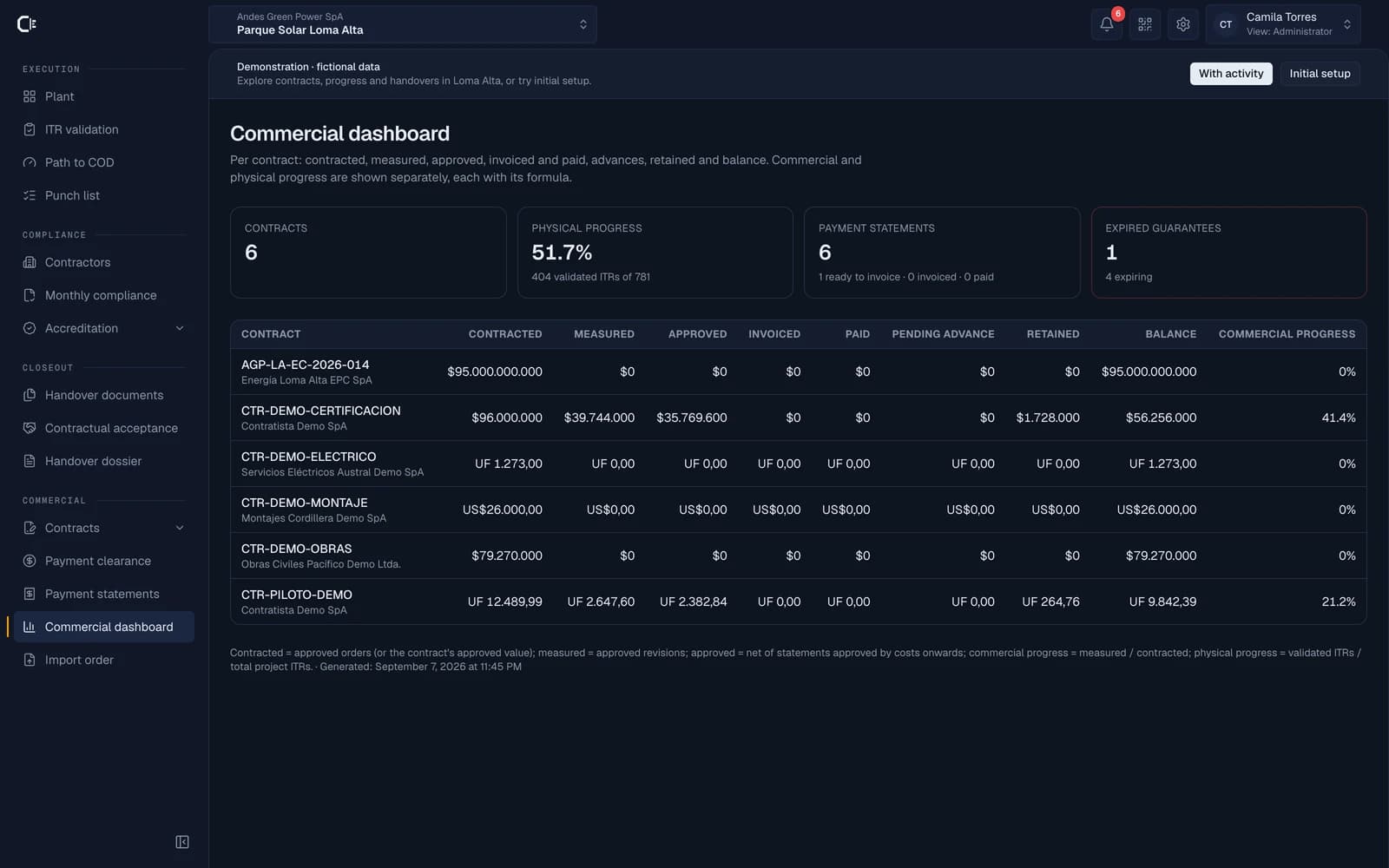
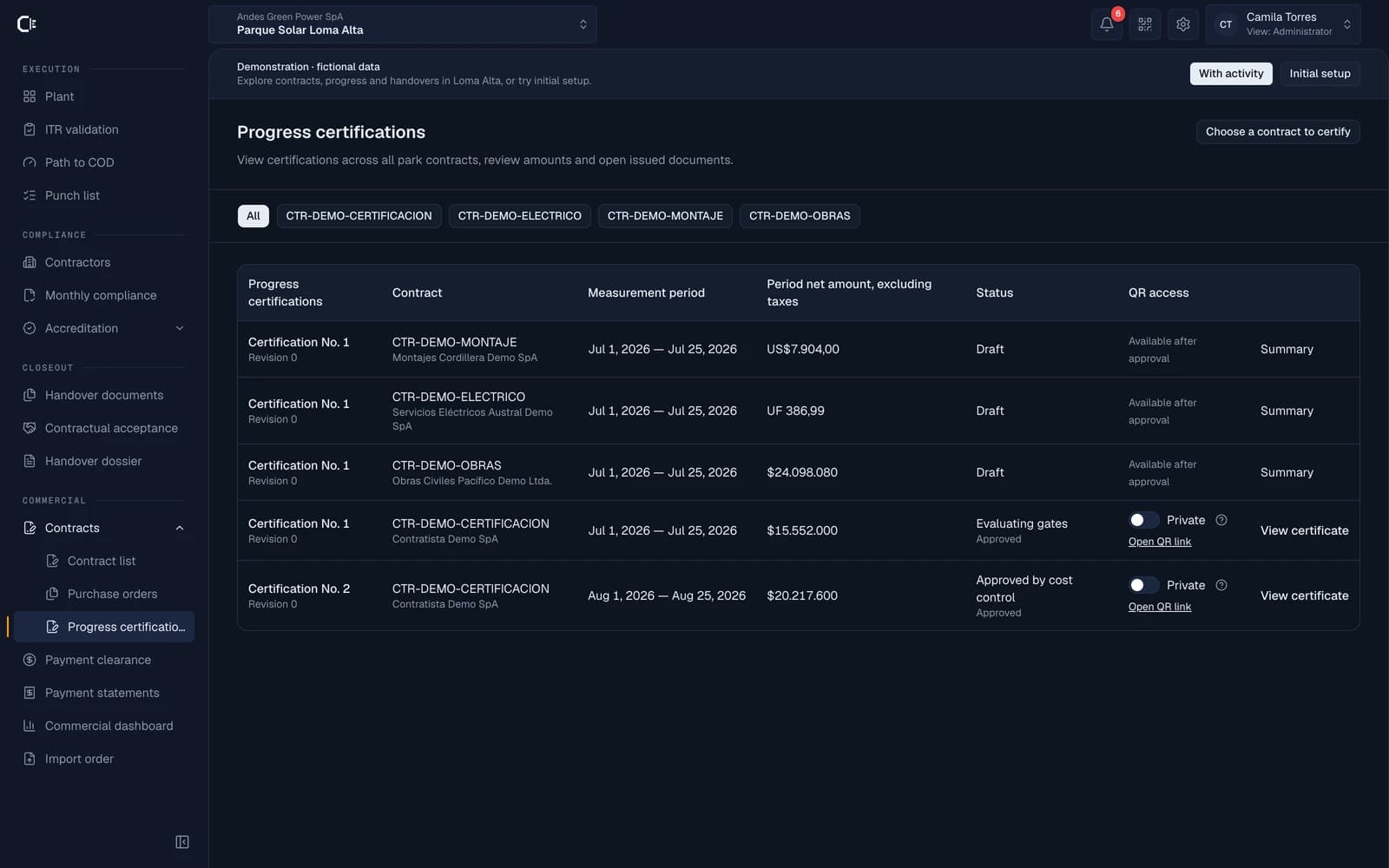
Contracts, purchase orders and payment applications linked to the work. Compare physical and commercial progress, review guarantees and track measured, approved, invoiced and paid amounts for each contract.

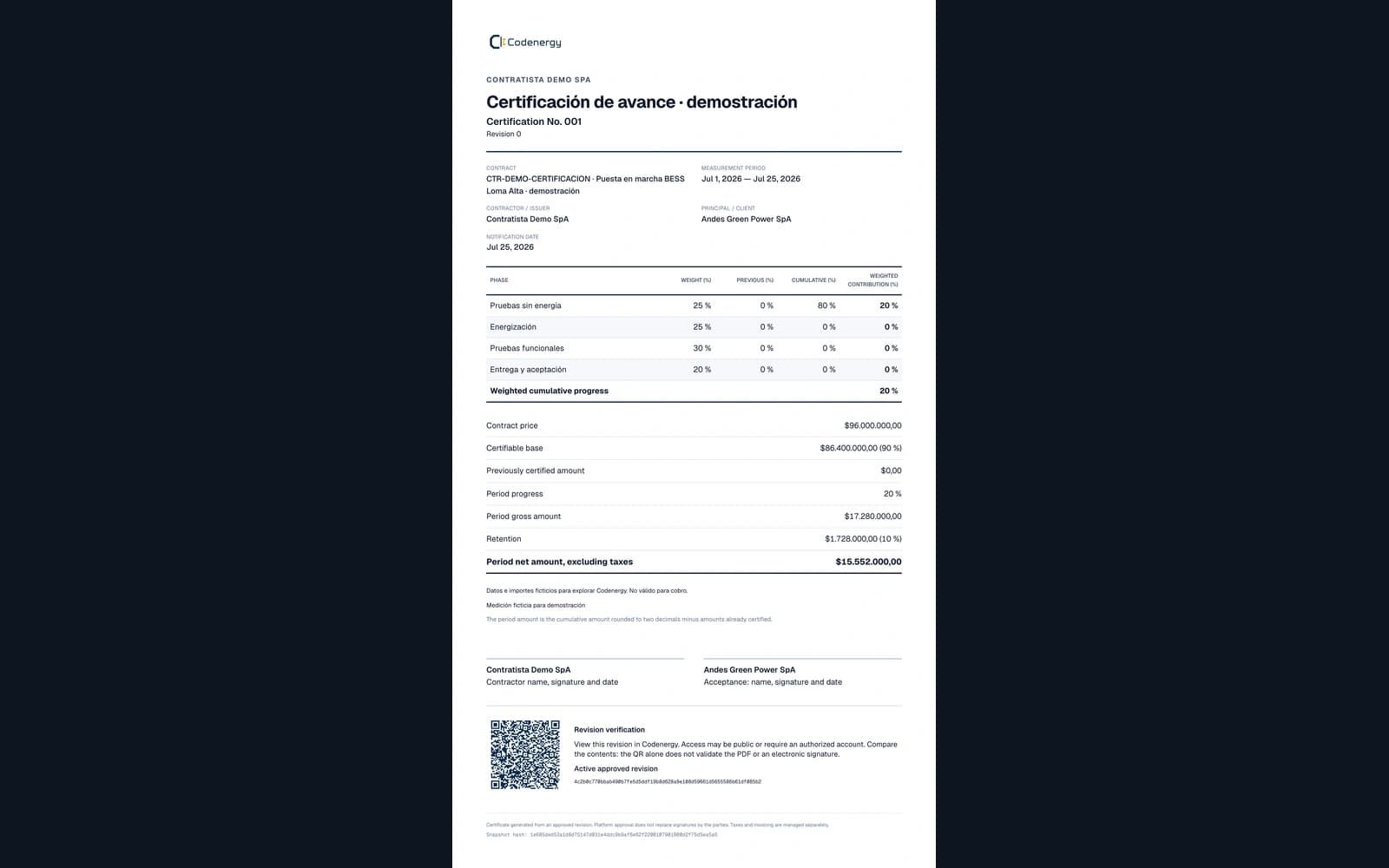
  • Line-item measurement or certification by weighted phases
  • Technical evidence and document requirements before invoicing
  • Advances, retentions, guarantees and balances by contract
Demo commercial dashboard with contracts, physical progress, payment applications and guarantees

04 · Handover

What is handed over, and the evidence behind it

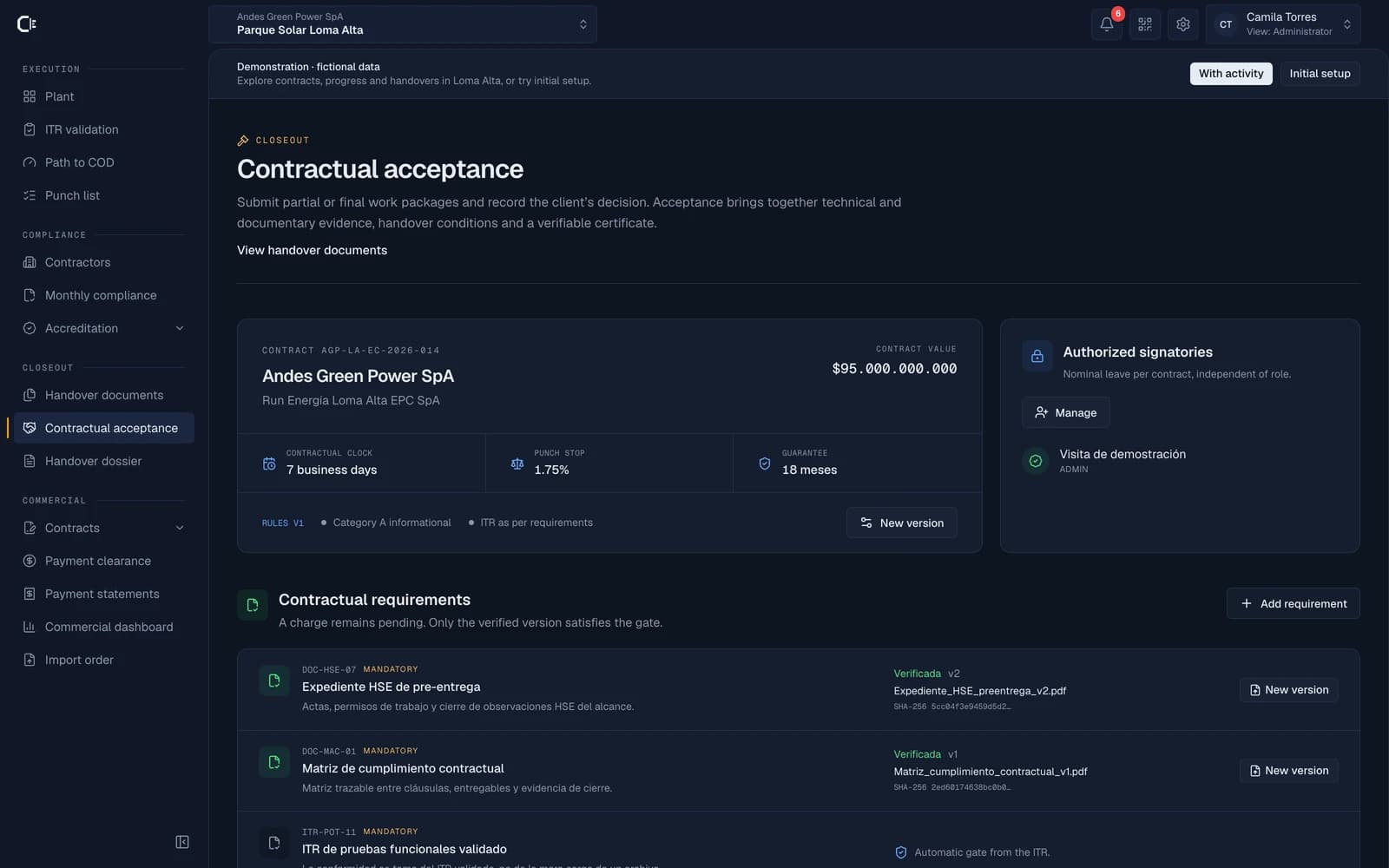
Acceptance is no longer an email tug-of-war. Rules agreed upon within the system, verifiable evidence, assessment of what is pending and a signed decision that remains frozen.

  • Acceptance Room with versioned rules agreed by both parties
  • Immutable revisions with a cryptographic hash
  • Handover dossier and certificates with verifiable access
Contractual acceptance in the demo: contract, requirements and packages with supporting evidence

From contract to payment

Every amount backed by progress and evidence.

Define the contracted scope, record progress for the period and submit a revision. Approval, document clearance and payment tracking stay connected, with amounts and responsibilities visible at every step.

01

Contracts and orders

A portfolio organised by contractor, with clauses and guarantees. Create main or supplementary orders and import their line items from CSV, with a template available for Google Sheets.

02

Measurement and certification

Payment applications based on line items or weighted phase progress. Keep cumulative amounts, retention and evidence together; each revision follows the contract approval workflow.

03

Invoices and payment tracking

Record invoices and partial payments, track advances and retentions, and review expiring guarantees. Payment applications in UF retain the official exchange value used.

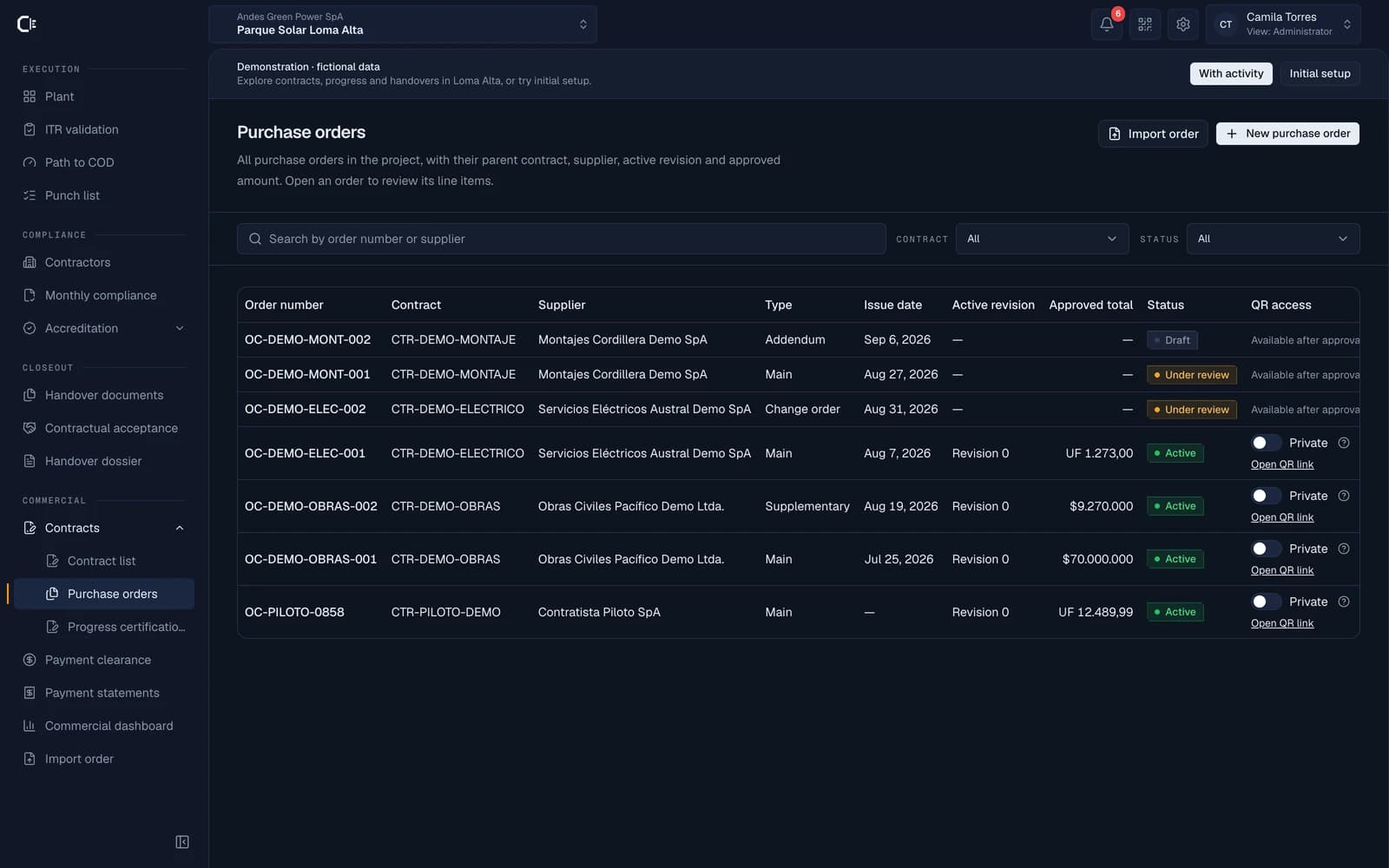
All project orders, with supplier, contract, revision and approved amount. Search, filter and open their documents from the same portfolio.

Demo purchase order list with contracts, suppliers, amounts and document visibility
Open full-size screenshot in a new tab

Explore example contracts and certificates, or practise setup in the initial configuration project. Both journeys use fictional data.

Documents in order at every stage.

Monthly compliance · Payment clearance · Handover documents

Each contractor uses its own account to upload required documents and address review comments. The project team reviews them by company and period; blocking requirements affect payment clearance. Contract handover keeps its documents and acceptance evidence together.

Who uses it

Everyone lands on their own work

One project, five ways to look at it. Each role's menu is exactly what that role can see and do: nobody navigates screens that aren't theirs, and nobody stumbles into another company's data.

Commissioning manager

Validates ITRs, resolves findings and reviews progress. Manages contracts, measurements and commercial approvals within assigned permissions.

Project · Validation · Path to COD · Commercial control · Acceptance

Field technician

Today's tasks and nothing else. Fills in the protocol point by point, attaches the photos and signs from the phone.

My tasks · Punch list

Contractor

Maintains company and resource records, and reviews its own contracts and payment applications.

Company · Accreditation · Own contracts and payment applications

Client or owner

Reviews progress and commercial status, checks handover packages and records the acceptance decision according to contract permissions.

Path to COD · Project · Commercial control · Acceptance · Dossier

Administration

Configures the project, its modules and team. Imports assets, manages templates and oversees the commercial workflow and exports.

The whole product · Setup

Inventory and equipment

Import assets from CSV, organise them by sector and generate QR labels to open equipment records in the field.

Planning and protocols

Configure test templates, assign ITRs to the team and load a schedule to compare the plan against validated progress.

A portable handover

Prepare the dossier and download data as CSV or an organised ZIP with supporting evidence. Keep a copy outside the platform.

In the field

Built for the field, not the office.

Enter the site with your QR pass, carry out your tasks and receive the updates that need your attention. All from your phone, beside the asset.

01

Your pass, one tap away

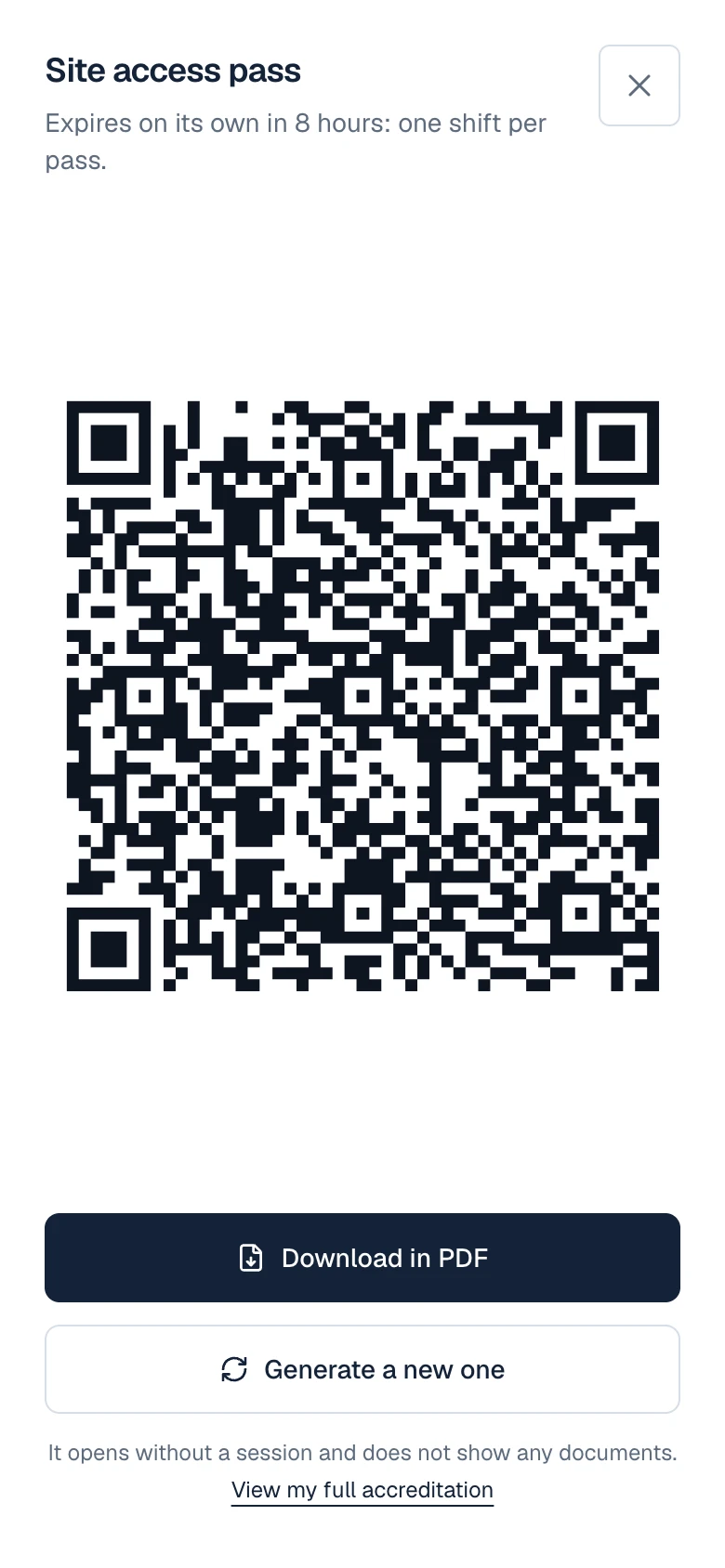
Show your QR code at the gate to check your accreditation status. A temporary pass lets the gate team verify access without exposing your documents.

Mobile site access pass with a full-screen QR code, expiry details and PDF download.

02

Today’s work, at hand

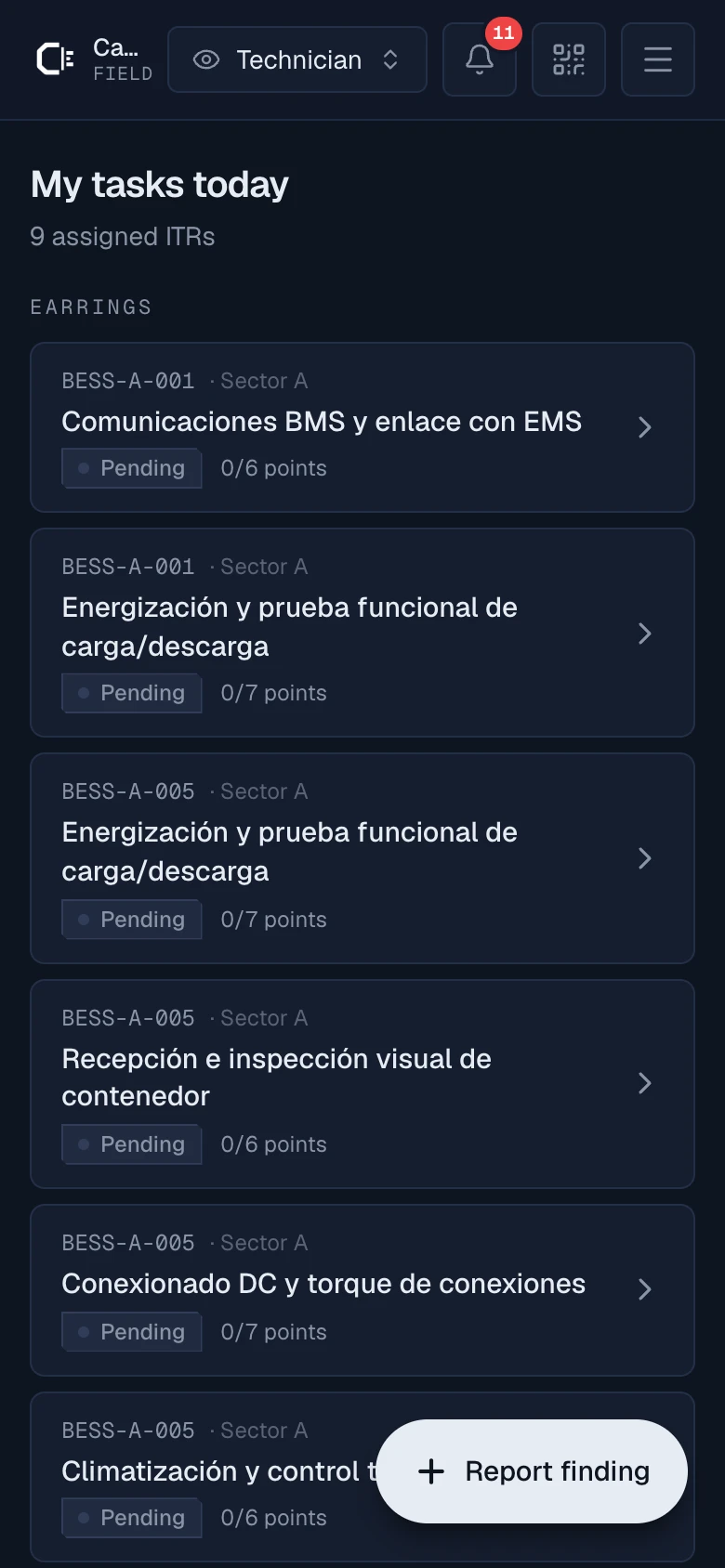
View your ITRs, complete each step, attach photos and sign beside the asset. The commissioning lead validates the same record you complete in the field.

Mobile Technician View: Your assigned ITRs for the day with your point-by-point progress

03

What needs your attention

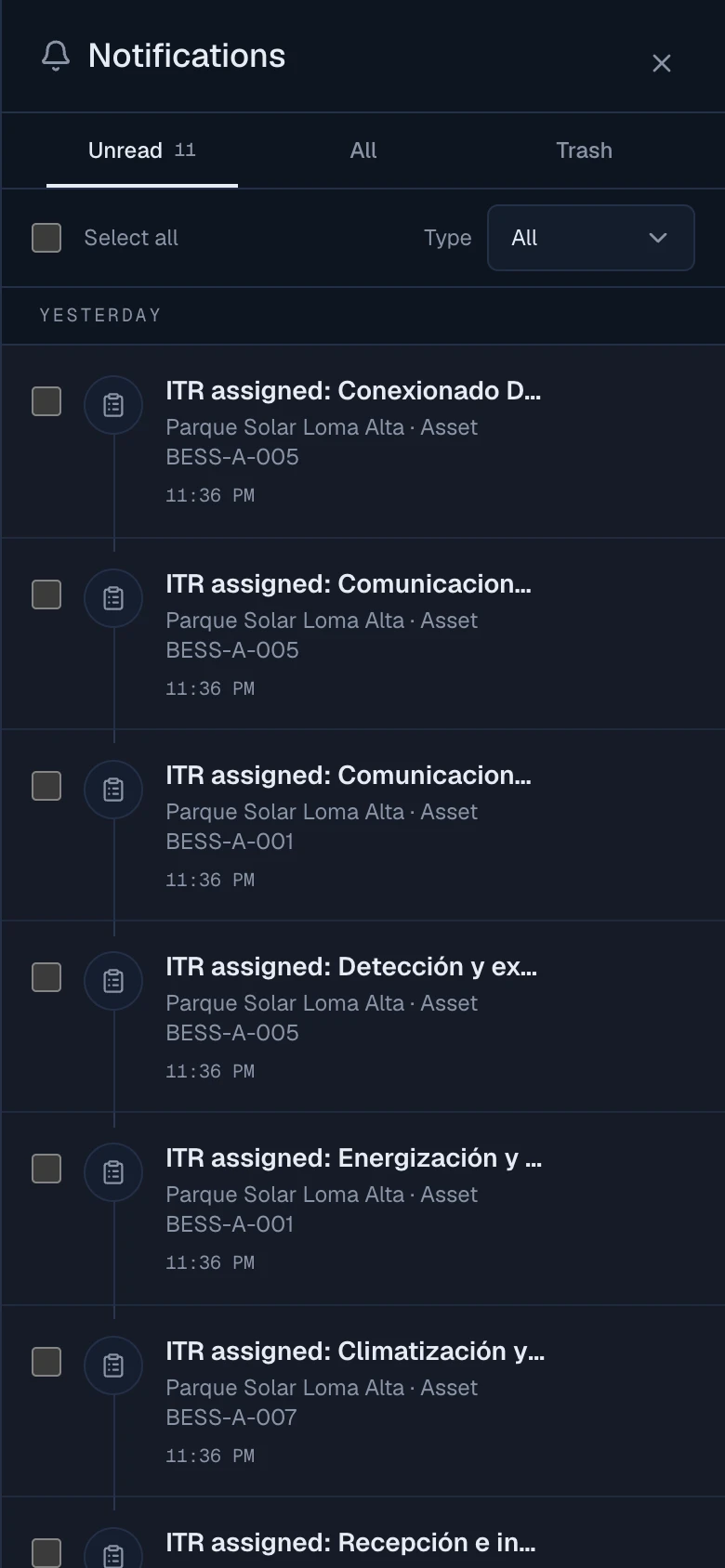
Assignments, reviews and blockers in a mobile inbox. Filter updates and open the record that needs action.

Mobile notification inbox with unread updates, filters and read status actions.

House rule: if a measuring instrument has an expired calibration, the protocol cannot be signed. The issue is stopped before it starts.

Notifications

Assignments, reviews and expiry dates.

Check your notifications on your phone or computer. Each notification takes you to the record that needs attention, with the context to continue working.

View the mobile inbox
Field work
Assigned ITRs, protocols awaiting validation and decisions from the commissioning lead. Plus findings that are assigned or closed.
Documents and access
Documents awaiting review, corrections for the contractor and site passes flagged with warnings or rejected.
Contracts and payments
Acceptances awaiting signatures, changes to payment applications and guarantees nearing expiry.

Integrations

Live alongside the systems your company already runs.

Codenergy takes from your ERP, your e-signature and your messaging what commissioning needs, and returns evidence. No blind syncs: every decision is made inside, with permission.

Statuses reflect what is integrated and tested in the product.

Trademarks and logos belong to their owners and are shown only to identify each system. They do not imply partnership, certification or sponsorship.

See all integrations

A system with consequences

Here the documents are not archived: they act.

A file manager stores documents. Codenergy connects each document to execution, so every status has an effect that the system applies automatically.

Expired credential

The person is blocked at the site gate. The QR shows it before the barrier opens.

Calibration expired

The instrument cannot be used to sign a protocol. An unsupported measurement does not count.

Blocking document expired

The company’s document clearance is held until the blocking requirement is compliant again.

Company not cleared

Its people and equipment can no longer operate on the plant until the company regains a valid approval.

Punch category A

Commissioning is held until the punch item is closed with evidence.

Review submitted

The acceptance revision preserves its evidence and digital fingerprint so reviewers can check exactly what was submitted.

  • Role-based permissions and data isolated by organisation
  • Private commercial documents, with optional public access
  • Spanish and English interface

Let's talk about your project

What does your project need to get in order?

Tell us where the project is today. We prepare a demo about that context, not a generic presentation.

  • Prequalification, accreditation and contractor access
  • ITRs, punch list and real progress in the field
  • Contracts, progress certificates and payment applications
  • Contractual acceptance and handover dossier
You can also contact us on WhatsApp (opens in a new tab)

No obligation · No robocalls

Ready